AI email assistant for Gmail, Outlook and Zoho Mail Your emails,
drafted automatically
Scribarius helps you take back control of your inbox, respond faster and stay organized, right inside Gmail, Outlook and Zoho Mail.


Free plan forever · 14-day trial of advanced features
Request a demo →Features
An inbox that works for you
Six tools that work together: reply faster and keep your inbox in order.
Respond faster
Accurate replies, ready to send
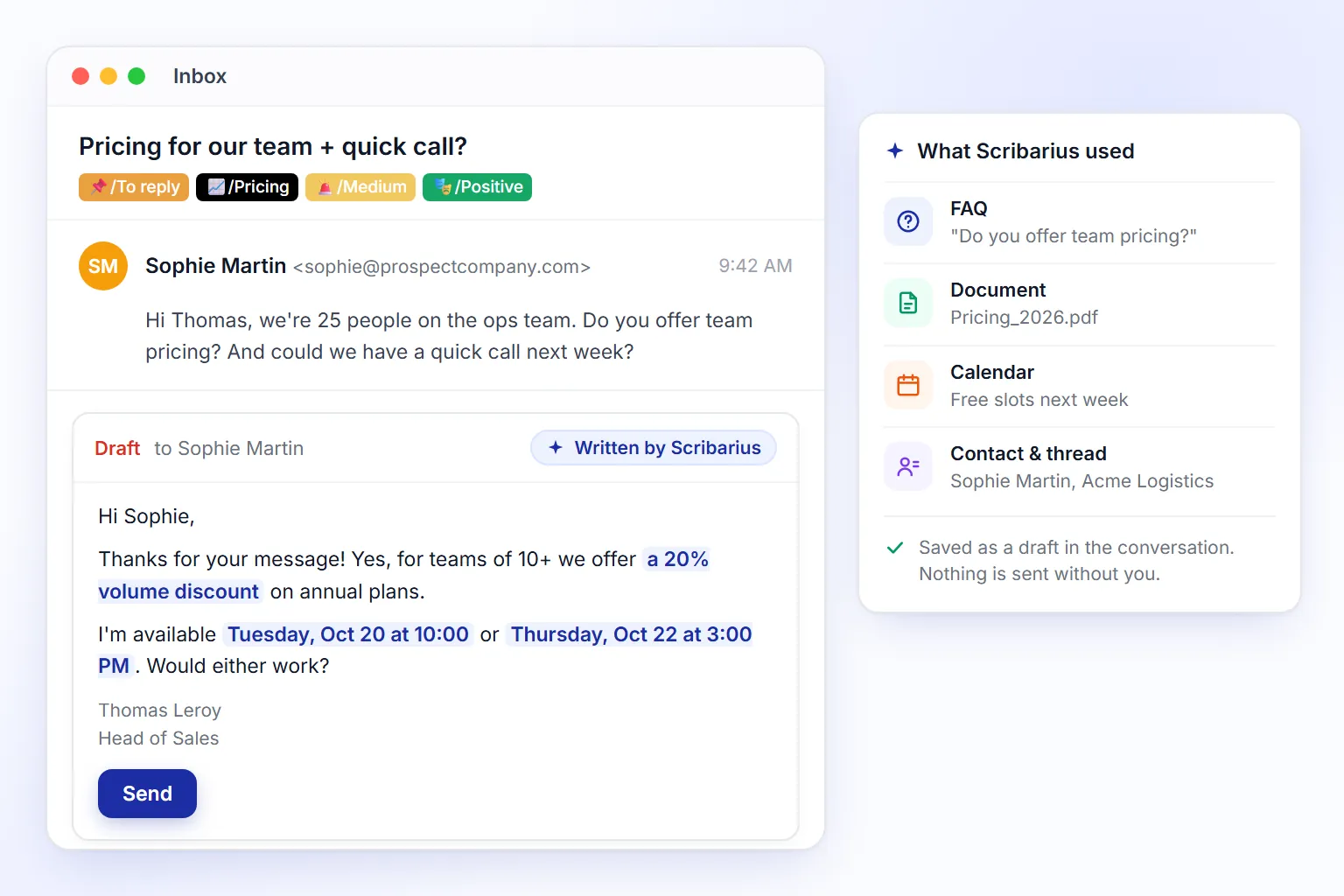
Scribarius reads each incoming email and its whole thread, then drafts a reply using your FAQs, documents, calendar availability and contact details. The draft waits in the conversation, ready for you to review and send.
- Grounded in your knowledge base
- Real time slots from your calendar
- Drafts by default, nothing sent without you
Never miss a follow-up
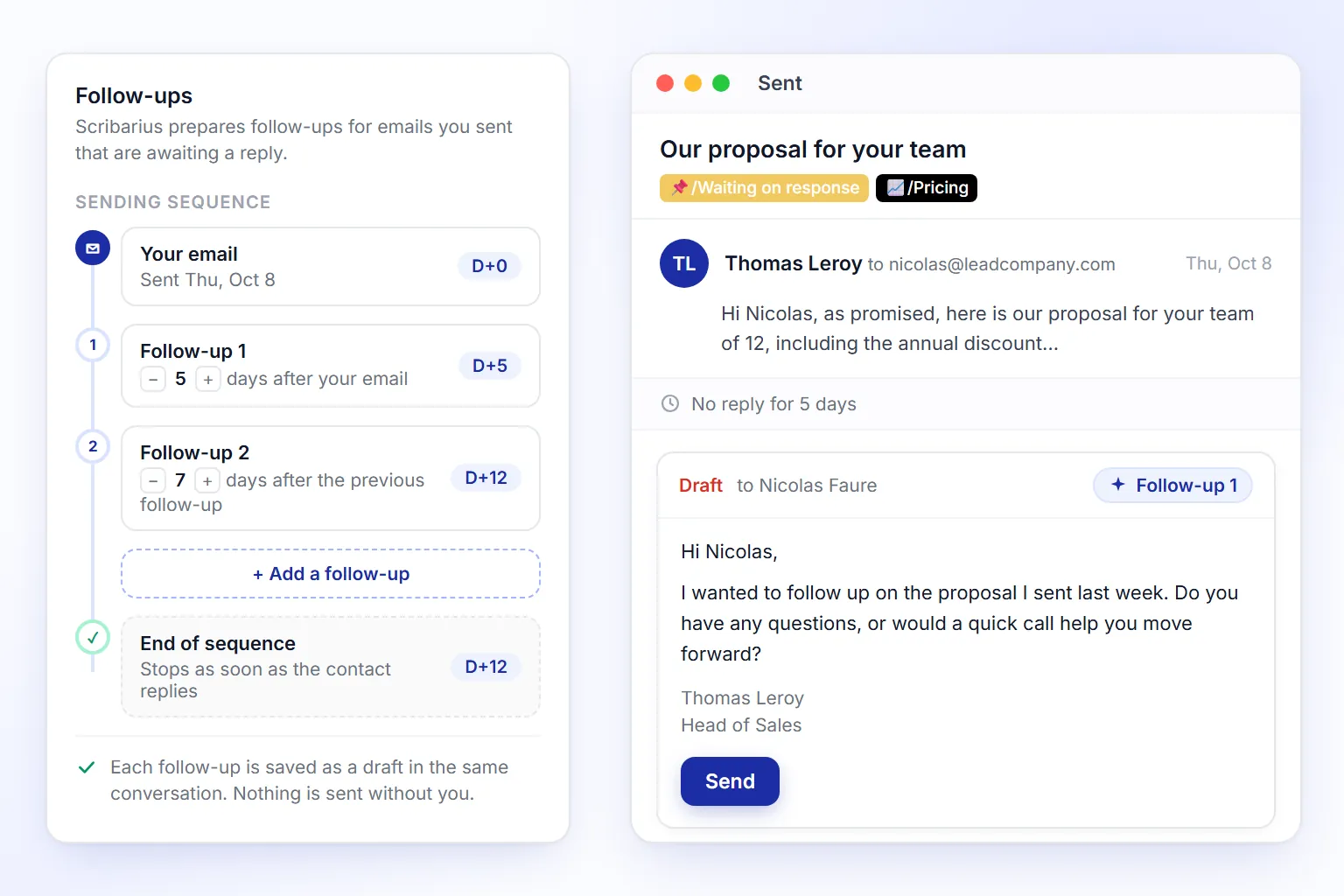
When an email you sent gets no reply, Scribarius prepares a follow-up in the same conversation, following the sequence you choose (for example after 5 days, then 7 more). It stops as soon as the contact replies.
- Your own follow-up sequence
- Stops automatically when they reply
- Saved as a draft, you stay in control
No more manual forwarding
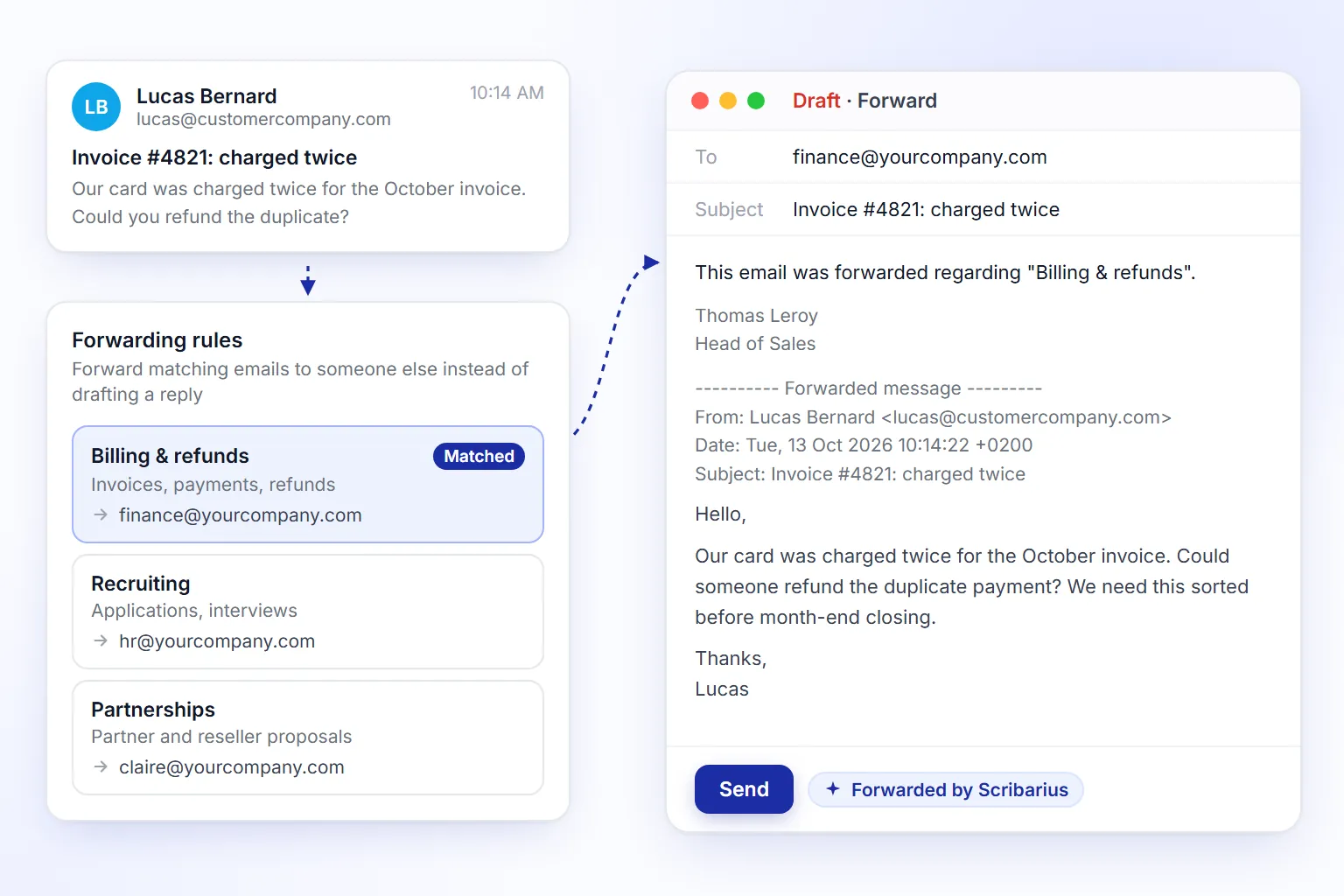
Set simple rules, like billing, recruiting or partnerships, and who handles each one. Scribarius spots matching emails and forwards them with a short note explaining why, instead of drafting a reply.
- Rules in plain language
- Forwarded with context
- Direct sending for trusted recipients
Stay organized
See what matters at a glance
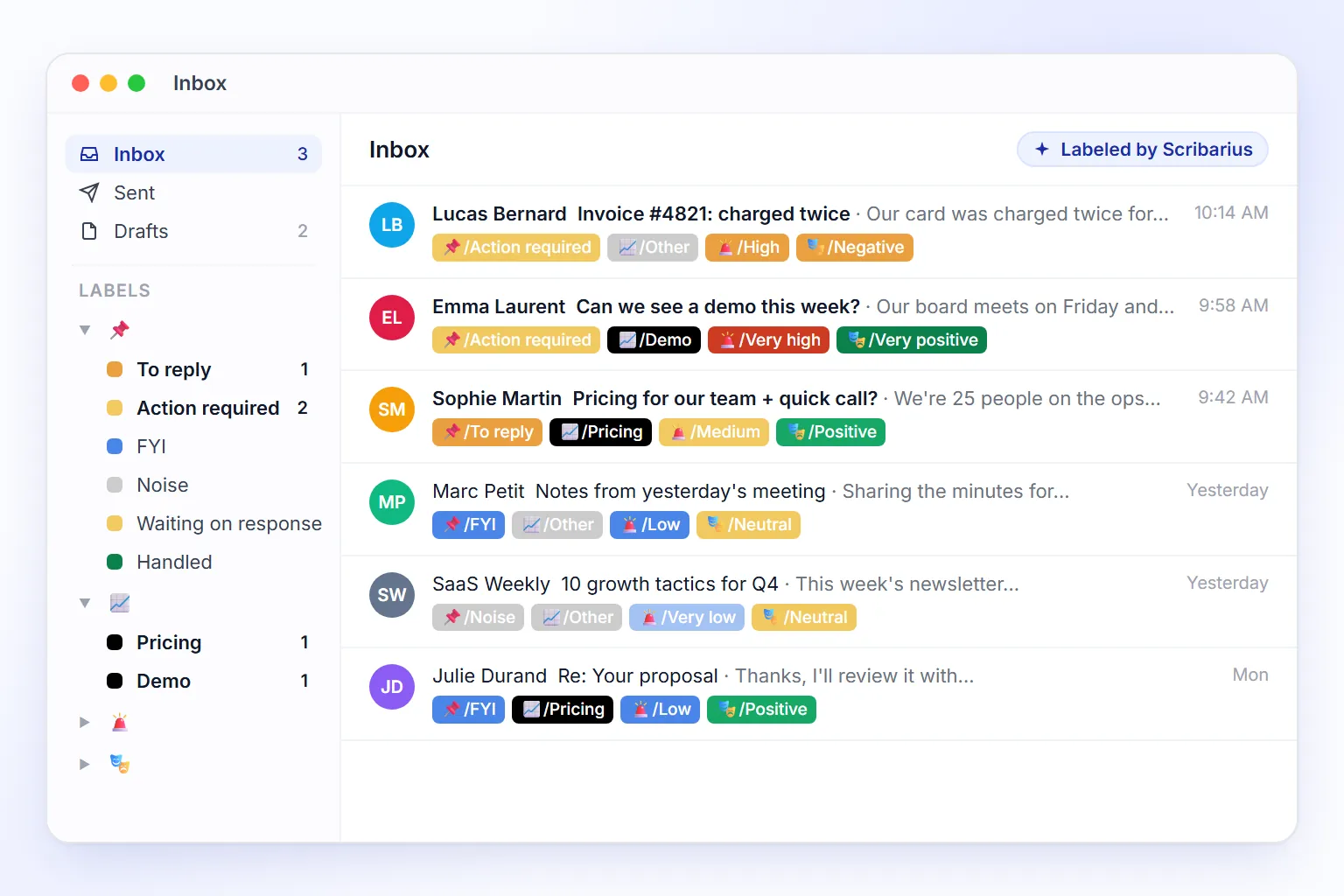
Every email is labeled by status (to reply, action required, waiting on response…), urgency, sentiment and topic, directly in Gmail or Outlook. Labels update as the conversation moves on.
- Status, urgency, sentiment and topic
- Topics tailored to your business
- Native Gmail labels and Outlook categories
No request slips through the cracks
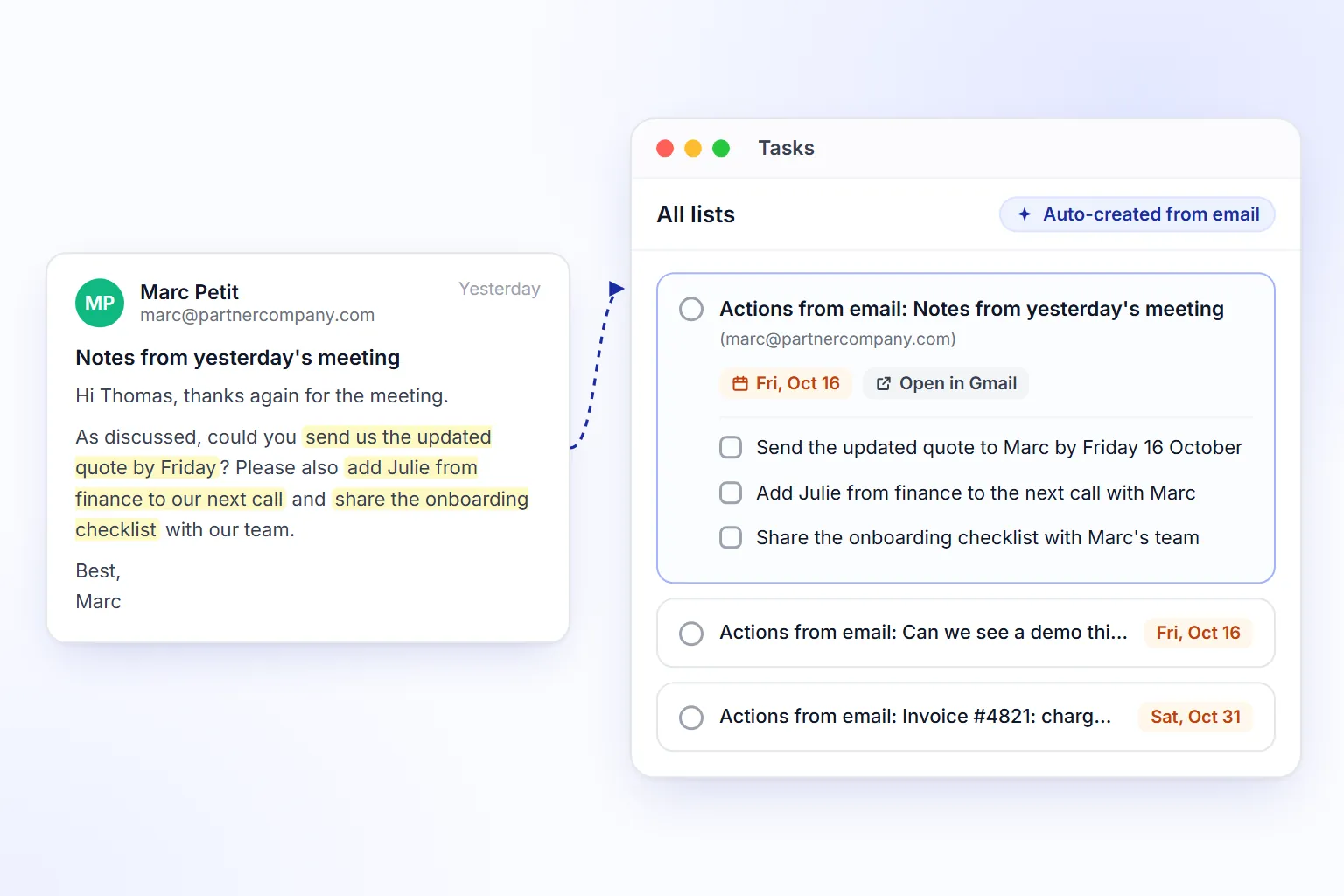
When an email asks you to do something, Scribarius creates a task with clear steps and the deadline mentioned in the email. All your tasks are in your Scribarius dashboard, each linked to its original email.
- Clear, actionable steps
- Deadlines detected automatically
- Linked to the original email
Write once, personalize every email
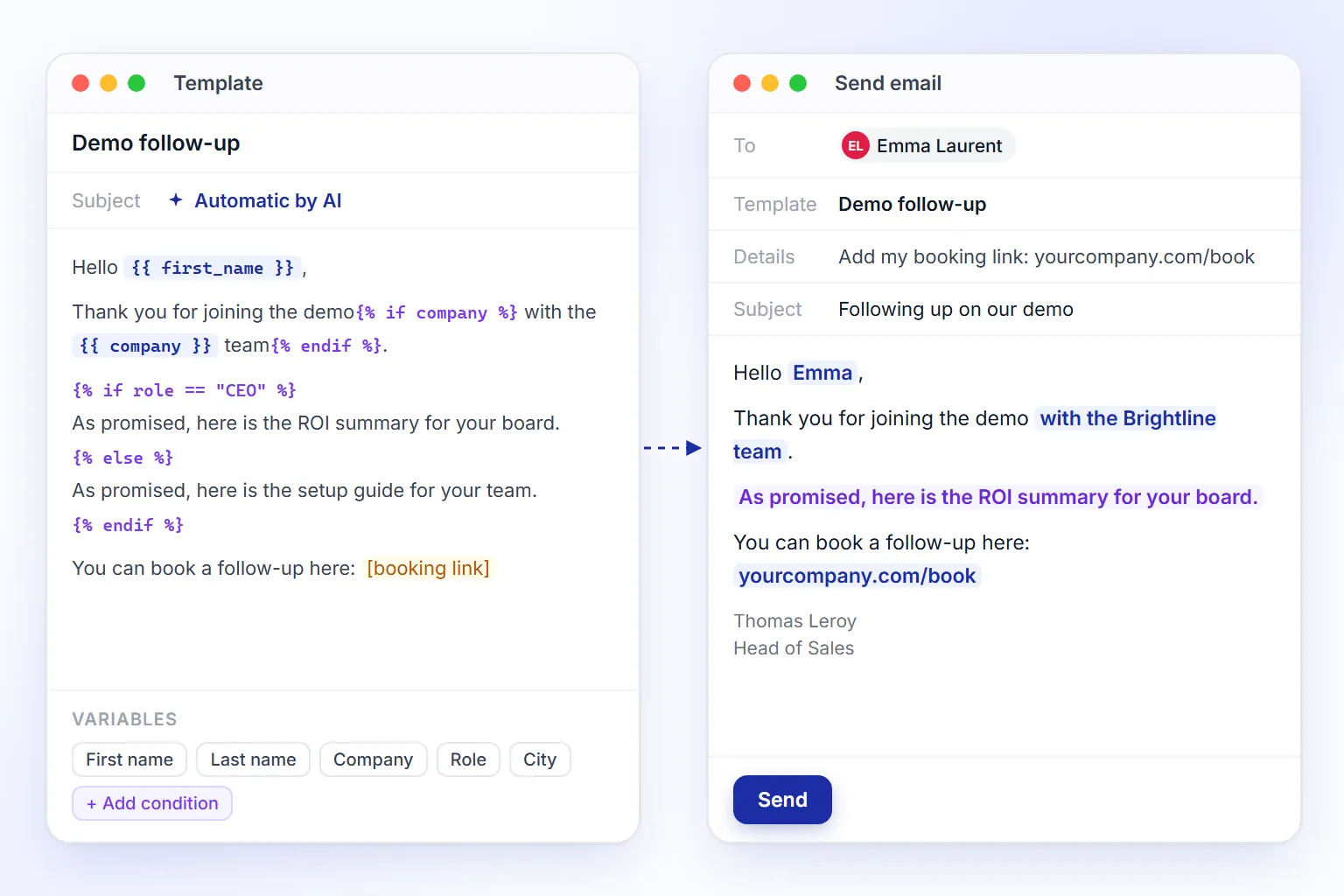
Write a template once with variables and conditions (first name, company, role…). Scribarius fills them from your contact data and the details you add, then writes an email ready to send.
- Variables and conditions
- Create a template with AI in seconds
- Send now or schedule
Ready to take back control of your inbox?
Save hours every week, right inside the inbox you already use.
Free plan forever · 14-day trial of advanced features
Request a demo →Pricing
Simple and transparent pricing
Start for free. Upgrade when you need to.
Free
To discover the tool and cover essential everyday needs.
/month
Billed annually
Start for freeStarter offer:
- Credits per month 1 credit = 1 AI action: manual use (email, template, Ask Scribarius) or automation. 100
≈ 5 AI actions per working day
- FAQs 10
- Documents 3
- File size 10 MB
- Templates 3
- Multilingual mode
- Integrations
- Contacts
- Tasks
Pro
For advanced users who need more capacity and features.
excl. VAT /month
Billed annually
Get started nowIncludes Free plan, plus:
- Credits per month 1 credit = 1 AI action: manual use (email, template, Ask Scribarius) or automation. 500
≈ 23 AI actions per working day
- FAQs 50
- Documents 10
- File size 25 MB
- Templates 10
Premium
For demanding professionals: unlimited access and priority support.
excl. VAT /month
Billed annually
Get started nowIncludes Pro plan, plus:
- Credits per month 1 credit = 1 AI action: manual use (email, template, Ask Scribarius) or automation. Unlimited
- FAQs 250
- Documents 50
- File size 50 MB
- Templates 50
- Ask Scribarius
- Priority support
- Feature request priority
Business
For teams: a shared workspace with tailored limits.
Billed annually
Book a demoIncludes Premium plan, plus:
- Credits per month 1 credit = 1 AI action: manual use (email, template, Ask Scribarius) or automation. Unlimited
- FAQs Custom
- Documents Custom
- File size Custom
- Templates Custom
- Team members Custom
- Shared workspace
- Advanced administration
- Custom integration
- Dedicated onboarding
Security
Your data stays yours
We designed Scribarius with a privacy-first architecture. We never store or sell your emails.
Encryption in Transit and at Rest
Your data is encrypted in transit and at rest using industry-standard encryption protocols.
Zero Email Retention
Emails are processed in real time and never stored. Your data is never used to train AI models.
Data Hosted in Europe
All data is hosted on secure servers located in France, ensuring strong protection and full compliance with European regulations.
GDPR Compliant
EU Data Protection
CASA Tier 2
Google Certified
SSL / TLS
Encrypted Connection
AES-256
Encryption at rest
FAQ
Frequently asked questions
How does Scribarius work with Gmail, Outlook, and Zoho Mail?
Scribarius connects securely to your Gmail, Outlook, or Zoho Mail account using official APIs. Incoming emails are automatically analyzed and AI-generated reply drafts are created for you to review and send. You can also compose new messages directly from the Scribarius interface. All emails are sent from your own mailbox.
Does Scribarius send emails automatically, or do I always review them first?
Replies, follow-ups and forwards prepared by Scribarius are saved as drafts by default: you can edit, send or discard them. Direct sending only applies to trusted recipients you add yourself, and it stays off until you do.
Can Scribarius follow up automatically on emails that get no reply?
Yes. When an email you sent gets no reply, Scribarius prepares a follow-up in the same thread, following the sequence you set (for example after 5 days, then 7 more). The sequence stops as soon as the contact replies, and every follow-up is saved as a draft for you to review.
Which tools does Scribarius integrate with?
Besides Gmail, Outlook and Zoho Mail, Scribarius connects to Zendesk and Freshdesk for customer support, HubSpot and Pipedrive for CRM, and Google Calendar and Outlook Calendar to offer real time slots in your replies. Custom integrations (ERP, internal APIs) are available on the Business plan.
Who is Scribarius for?
Scribarius is built for professionals who handle a lot of email: sales teams following up with prospects, customer support teams with response targets, recruiters, real estate agents, agencies managing client requests and founders of small businesses. It works for a single user as well as for a team sharing one workspace.
How is Scribarius different from Gemini in Gmail or Copilot in Outlook?
Gemini and Copilot are writing aids you call up one email at a time. Scribarius works on its own in the background: it drafts replies from your FAQs and documents, follows up when nobody replies, forwards emails by topic, labels your inbox and turns requests into tasks. It works the same way in Gmail, Outlook and Zoho Mail, and your data is hosted in France.
What languages does Scribarius support?
Scribarius supports 11 languages: Arabic, Danish, English, French, German, Hindi, Italian, Japanese, Korean, Russian, and Spanish. It automatically detects the language and adapts its suggestions.
Does Scribarius allow sharing resources between users?
Yes, Scribarius offers a sharing option for certain resources between users. The Business plan includes a full shared workspace where FAQs, documents, contacts, templates, and tasks can be shared across the team.
Master your inbox. Reclaim your time.
Get started in 30 seconds. No credit card required.
Free plan forever · 14-day trial of advanced features
Request a demo →