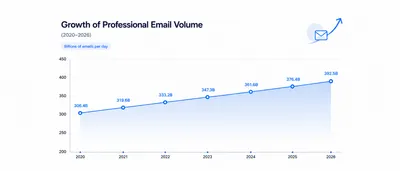
The average professional spends 28% of their workday reading and writing emails. That’s nearly 2.5 hours every day. Most of that time is not spent on complex or strategic messages: it goes to routine replies, status updates, follow-ups, and inbox triage. The good news is that these are exactly the categories where systematic habits (and the right tools) make the biggest difference.
Here are five concrete approaches that cut email time significantly, with or without any AI tool.
Why Email Writing Takes So Long
Writing a professional email is not just typing. Before you send a single message, you spend time:
- Absorbing the context of the thread, especially long or multi-party ones
- Deciding on the right tone for the recipient
- Finding the right phrasing so the message reads as intended
- Checking for grammar and clarity
- Digging through older threads or documents to confirm details
Multiply each of these steps by 40-80 emails a day, and the cognitive load compounds fast. Most professionals underestimate how much mental energy goes into crafting responses that feel right, until they find a way to reduce that friction.
5 Approaches That Actually Work
Schedule Your Email Time
Checking email constantly is one of the highest-cost habits in knowledge work. Each interruption breaks concentration, and the context switch costs far more time than the email itself.
A simple fix: designate 2-3 fixed email blocks per day (morning, midday, end of day) and close the inbox outside those times. Within each block, process systematically: reply, delegate, archive, or defer. This works because you handle email in batches, which is faster than context-switching every few minutes, and you protect large uninterrupted blocks for focused work.
Write Shorter Emails
Long emails get skimmed or postponed. Busy recipients mentally file a wall of text under “deal with later,” which means a second email to follow up and more time lost.
Aim for under 150 words per email. Put the action or question in the first two sentences, not buried in paragraph three. Write one ask per message: if you need two things, send two emails or use a numbered list so nothing gets missed. For subject lines, be specific: “Your Q3 proposal: 2 questions before we move forward” gets opened; “Following up” gets ignored.
Build a Template Library
Most professionals write the same 10-15 types of emails over and over: meeting requests, follow-ups after calls, status updates, handovers, rejections. Each time, they start from scratch.
Identify your most recurring message types and write one solid version of each. Store them in a shared doc or your email client’s draft/template feature. When the time comes, you personalise the relevant parts and send. Personalising a good template takes less time than composing from a blank page, and the output is more consistent.
Set Up Labels and Inbox Rules
Before writing any email, you have to decide what deserves attention. That triage is real work that adds up across a day.
Use your email client’s labelling and filter features to pre-sort your inbox. The key is to only use stable, permanent categories: by client, by project, by domain (sales, HR, finance, support). Set these up once using automatic rules based on sender or subject, and they never need manual updating. When you open your inbox, the context of each message is immediately visible.
Establish Clear Routing in Team Inboxes
Shared inboxes without clear ownership rules are slow. When everyone assumes someone else will handle a message, emails sit unanswered, duplicated effort happens, and context is lost in forwarding chains.
Fix this with explicit routing: document which email type goes to which person or team. For a client-facing inbox, that might mean billing questions go to finance, technical issues go to support, and partnership requests go to sales. Clear rules mean the right person acts on the first touch.
How Scribarius Automates This
The approaches above work manually. Scribarius takes each one and removes the friction:
- Template library: Smart Templates connect to your CRM, calendar, and documents. Apply a template and it fills in the relevant details automatically, no manual variable-filling required.
- Labels and rules: Smart Labels automatically categorise every incoming email by urgency, status, sentiment, and topic. Labels update as conversations evolve.
- Team routing: Auto Forwards analyse incoming messages and route each one to the right person on your team, without manual forwarding or triage.
- Reply drafting: Auto Replies read the full conversation thread and pull context from your connected tools, then generate a draft you review and send.
For European teams, Scribarius is also GDPR-compliant by design: emails are processed in real time and never stored, and all data is hosted in France.
Start Saving Time on Email Today
Scribarius connects to your Gmail or Outlook account in 30 seconds and immediately works inside your existing inbox.
Most users save several hours per week from the first few days, without changing how they work, just removing the friction from tasks they were already doing.
Try it free, no credit card required.
Tags